
Welcome to Day 19 of the MyWebHost Advent Calendar! 📅
This brings us to the end of Week 3: Content. We found the keywords (Door 13), built the pages (Door 14), wrapped them in SEO (Door 15), built trust (Door 16), and told stories (Door 17).
But there is a trap waiting for you in January. It is called the “New Year’s Resolution Effect.”
You know the drill. You join a gym on January 1st. Not only that, but you go 5 times a week. By January 21st, you are tired. By February, you stop going entirely.
The same thing happens with business blogs. You write 3 posts in week one, get overwhelmed, and then your blog sits silent for 6 months. A silent blog looks like an abandoned shop. But today, we are going to stop that from happening. We are going to build a Content Calendar—a plan that keeps you consistent without burning you out.
Why “Consistency” Beats “Intensity” 🐢
Google is like a hungry pet. It prefers regular meals over a giant feast once a year.
- Scenario A: You publish 10 posts in January, then nothing until June.
- Result: Google crawls you, sees activity, then assumes you have gone out of business. Your rankings drop.
- Scenario B: You publish 1 post every single Tuesday.
- Result: Google learns your schedule. The “Googlebot” comes back every Tuesday to check for new food. Your traffic grows steadily (Compound Interest).
Well, it’s not quite like this, and it can get very nuanced, but you get the rough idea.
The Rule: Pick a schedule you can stick to on your worst week, not your best week. Even once a month is fine, as long as it is consistent.
The “Topic Recycling” Strategy: Work Smarter, Not Harder ♻️
The biggest fear is: “I will run out of things to say.” You won’t. You just need to learn how to cook the same turkey in different ways. One “Core Idea” can become 5 pieces of content.
The Core Idea: “How to secure a WordPress site.” (Based on our Door 4).
- The Blog Post: A detailed 1,500-word guide on your website. (The main meal).
- The Newsletter: A short summary sent to your email list linking to the post. (Leftovers).
- The Social Post: A carousel for Instagram/LinkedIn: “5 Tips to Secure WordPress.” (The snack).
- The Video: A 60-second YouTube Short showing how to install a plugin.
- The FAQ: Add the key point to your Services page FAQ section.
You don’t need 52 ideas for a year. You need 12 Core Ideas (one per month), recycled into weekly content.
How to Build the Calendar (The Template) 🗓️
You don’t need expensive software. A Google Sheet or Trello board is perfect.
Column 1: The Theme
Assign a theme to each month.
- January: Fresh Start / Cost Savings.
- February: Love / Customer Care.
- March: Spring Cleaning / Maintenance.
Column 2: The Keyword
What question are you answering? (From your Door 13 list).
- Example: “How to save money on heating.”
Column 3: The Format
Is it a How-To guide? A Case Study? A Listicle?
Column 4: The Status
Idea > Draft > Editing > Scheduled > Published.
The “Batching” Secret: How Pros Do It 🏭
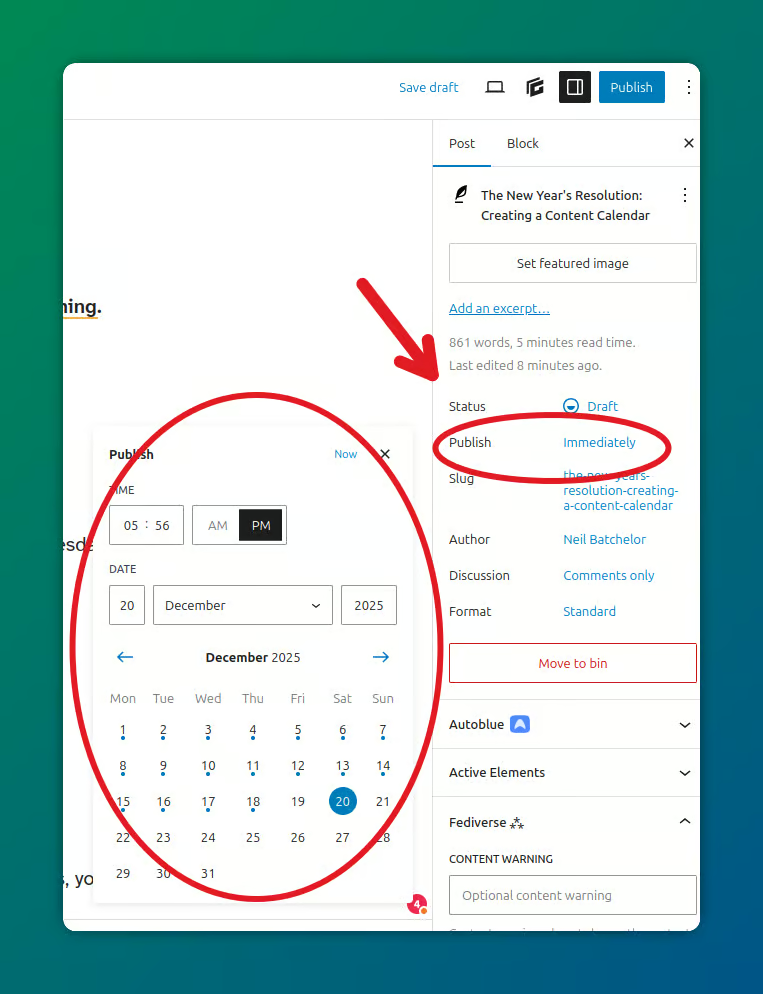
Do not wake up on Tuesday morning and think: “Oh no, I need to write a post today.” that is stressful. Pros use Batching.
Set aside one day a month (e.g., the first Monday).
- Hour 1: Plan 4 titles.
- Hour 2: Outline the headings for all 4 posts.
- Hour 3-6: Write the drafts.
By the end of the day, you have content for the entire month. Schedule them in WordPress to auto-publish every Tuesday. Now you can forget about blogging for 30 days and get back to running your business.
Seasonal Content: Riding the Wave 🌊
Don’t forget the calendar on the wall. Align your content with the real world.
- Black Friday (Nov): “How to prepare your website for sales.”
- Christmas (Dec): “Our opening hours / End of year review.”
- Summer Holidays (Jul-Aug): “Trends for the year ahead.”
Google sees a spike in searches for these terms at specific times. If you have the content ready before the spike hits, you catch the traffic wave.
Tip: Update your old seasonal posts! Don’t write a new “Black Friday Tips” post every year. Just update the year on your 2024 post to 2025 and repost it. Keep it fresh.
Summary Checklist: Your 2025 Plan
- [ ] Frequency: Decide your pace. (Weekly? Fortnightly? Monthly?). Be realistic.
- [ ] Brainstorm: List 12 Core Topics (one for each month).
- [ ] Keywords: Match a Long Tail Keyword to each topic.
- [ ] Schedule: Put “Content Day” in your diary for next month.
Planning feels like work, but it is actually freedom. It frees you from the daily panic of “What should I post?”
🎄 What is Your January Theme?
The New Year is the best time for “Fresh Start” content. If you are a cleaner, it’s “Decluttering.” If you are an accountant, it’s “Tax Prep.”
What is the first topic you are going to write about in January? Commit to it now by posting the title in the comments below!
Check back tomorrow to open Door 20, where we ask the big question…